- Home
- /
- Free SEO Tools
- /
- Meta Title & Description Checker
Meta Title-description Length
and Pixel Checker
TEQTOP's Meta Title-Description Length and Pixel Checker can help you better optimize your website's search engine (SERP) appearance and provide a live preview to show how your Meta title and description will be visible in SERPs for users. This tool offers mobile and desktop SERP previews for search engines like Google, Bing, and Yahoo.
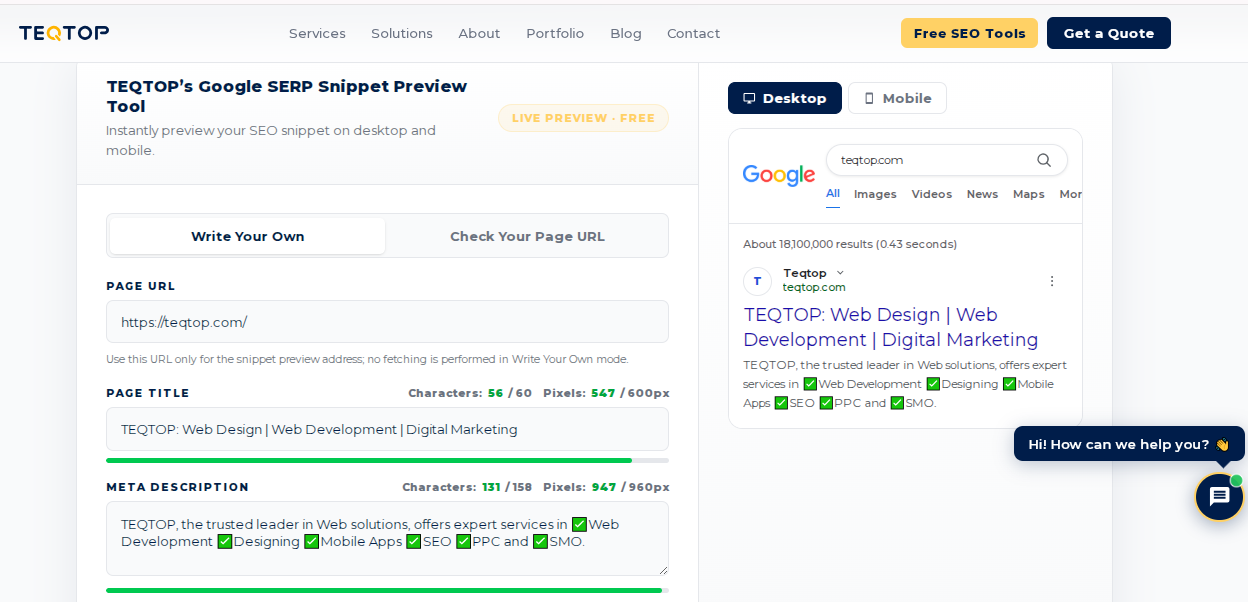
TEQTOP's Google SERP Snippet Preview Tool
Instantly preview your SEO snippet on desktop and mobile.
Use this URL only for the snippet preview address; no fetching is performed in Write Your Own mode.

How to Use TEQTOP’s Google SERP Simulator
Optimizing your search snippets is simple. Choose the method that fits your workflow:
The Live Editor (Drafting Mode)
If you are currently writing content and want to see how a title looks in real-time, use this mode:
- Navigate to Free SEO Tools.
- Select the Meta Title and Description Length & Pixel Checker.
- Enter your planned Title and Meta Description directly into the provided fields.
- Watch the preview update instantly on the right side to see if your text stays within the optimal limits.
The URL Audit (Optimization Mode)
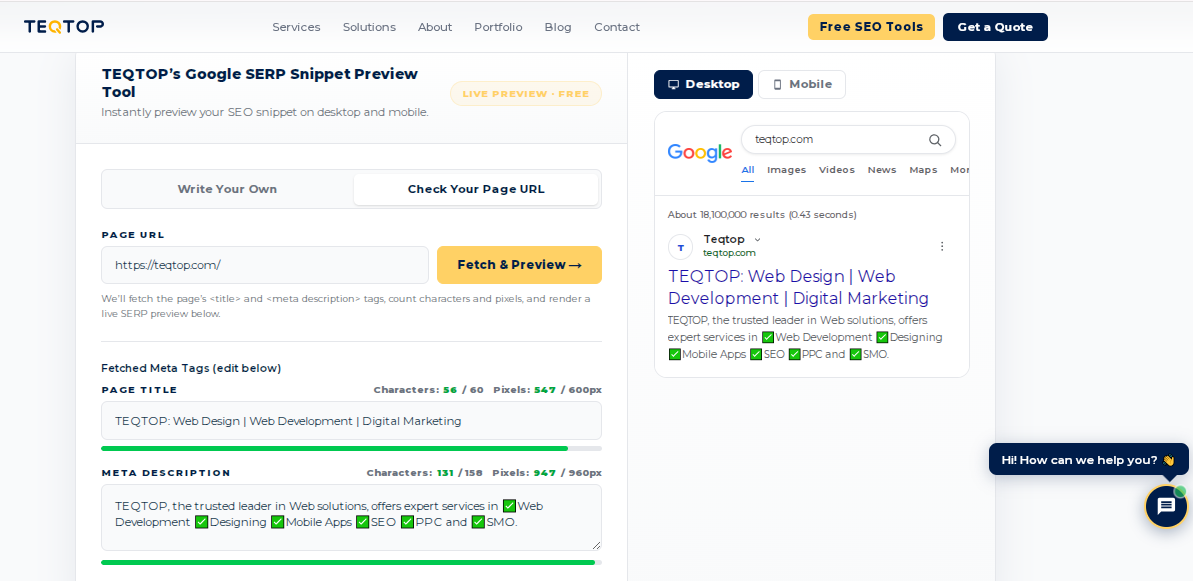
Want to check how your live pages are currently performing?
- Go to our Free SEO Tools page.
- Select the Meta Title and Description Checker.
- Simply paste your page URL into the input box and click "Check."
- Our SERP Preview tool will pull your current meta tags and display your live Google SERP snippet preview immediately.
Master Your Search Appearance
Perfect your meta titles and descriptions in seconds. No sign-up, No stress.
Don't waste those first 120 characters on unnecessary things. Start with your primary keyword and a clear benefit or CTA to grab attention before the user even thinks about scrolling. Whether you are a developer, content creator, or SEO specialist, the way your website appears on Google determines your click-through rate. Do not let your hard work get cut off by ellipses. Use TEQTOP’s Meta title and description checker to preview exactly how your pages will look on desktop and mobile before you hit publish.
Quick Optimization Checklist
Do not publish until you have hit every point on this list. Use our meta title and description checker to verify each one in seconds:
- ✔ Primary keyword in the first 50% of the title
- ✔ Title under ~580px
- ✔ Description under ~920px
- ✔ Clear benefit or value proposition
- ✔ Call-to-action included
Why Use Our Meta Title and Description Checker or SERP Checker?
We believe in fast, friction-free tools. Here is why users love our simulator:
- No Sign-up: No accounts, no emails, no waiting. Just open and optimize.
- Instant Visuals: See your desktop and mobile results side-by-side.
- Precision-Focused: We ensure titles and descriptions are optimized for all screen sizes.
What Does This Tool Do?
Our Meta title length checker tracks your headline against Google's pixel limits to ensure it never gets cut off. Our Meta Length Checker gives you the exact character count for both your title and description, so you hit the sweet spot every time. Allows you to see exactly how your page title displays on desktop vs. mobile. You can check Pixel length, A simple way to verify if your pixel length is correct or not according to the word limit.
What Are Meta Tags?
Meta tags are hidden bits of code on your webpage. They don’t show up on the page itself, but they act as a set of instructions for search engines like Google. Think of them as a label that tells Google what your page is about so it can show your site to the right people.
What Is a Meta Title?
The meta title is the headline you see as the big, clickable blue link in search results. It is the most important part of your page’s SEO.
- Why it matters: It is your first impression. If it’s clear and hits the user's search intent, they will click. If it’s confusing or cut off, they will skip to the next result.
What Is a Meta Description?
The meta description is the short paragraph of text below the title. Think of it as your elevator pitch.
- Why it matters: It is your chance to convince the user to choose your link over the competition. A good description answers the user’s question or shows them exactly what they will get by clicking.
What is the Ideal Meta Title and Meta Description Length?
Meta tags are measured in pixels, not characters. Here's what that means for how you show up in search.
Meta Title
| Length | Zone | What It Means |
|---|---|---|
0–30 chars | Too short | Keywords missing. You're giving up search real estate. |
30–60 chars | Optimal | Fits Google's 580px limit. Shows in full on most queries. |
60–70 chars | Borderline | May truncate on mobile or for longer keywords. |
70+ chars | Truncated | Google cuts it with "…", hurts clicks. |
Meta Description
| Length | Zone | What It Means |
|---|---|---|
0–120 chars | Too short | Not enough room to sell the click. Add a value prop. |
120–160 chars | Optimal | Industry standard. Displays in full on Google desktop. |
160–200 chars | Borderline | Hit or miss, depends on the query and device. |
200+ chars | Truncated | Will be cut off. Put your best info first. |
The Pixel vs. Character Reality
- Why Characters Lie: Google measures by pixels (580px for titles, 920px for descriptions), not just character counts. A title with five "W"s is wider than a title with five "i"s.
- The TEQTOP Advantage: Our tool calculates precise pixel width to ensure your message doesn't get cut off by an unhelpful "..." in the middle of your call to action.
Why Do We Need Meta Tags?
- Search Rankings: Google uses these tags to figure out if your page matches what a user is looking for.
- More Clicks: A well-written title and description turn people searching on Google into visitors on your site.
- Professionalism: Clean, well-optimized snippets build trust before a user even lands on your site.
Why You Must Check SEO Title and Description Properly
Google has a limit on how much text it displays. If your title or description is too long, Google cuts it off with an ellipsis (...), which hides your most important message.
- Use our meta title and description checker: This tool shows you exactly how your snippet looks on desktop and mobile.
- Avoid Truncation: Use our meta title length checker to make sure your headline fits perfectly (under 600 pixels).
- Get the Sweet Spot: When you use our Meta Length Checker, you ensure your call to action is fully visible, which leads to a much higher click-through rate.
How to Write Meta Tag
- Keep it short: Aim for 50-60 characters for titles and 140-160 for descriptions.
- Use Keywords: Put your main keyword near the start.
- Include a CTA: Give the user a reason to act, like "Shop Now," "Get the Guide," or "Learn More."
What People Ask Most About Meta Tags and How Google Displays Them
Your Meta Tags Might Be Costing You Traffic
Bad titles and weak descriptions kill clicks before anyone lands on your site. Our On-Page SEO team fixes that.